Printable Planner Sizes Explained: A4, Letter, A5, Half Letter and Why Buyers Care
Why size is the number one support question
Buyers live in different paper worlds. North America prints on US Letter and Half Letter; most of the rest of the planet uses A4 and A5. A file offered in only one of those forces half your potential market to scale, crop or give up. Offering both families in one bundle is the single cheapest way to widen your market and cut your support inbox at the same time, and it costs you one export session rather than a redesign.
The four sizes that cover almost everyone
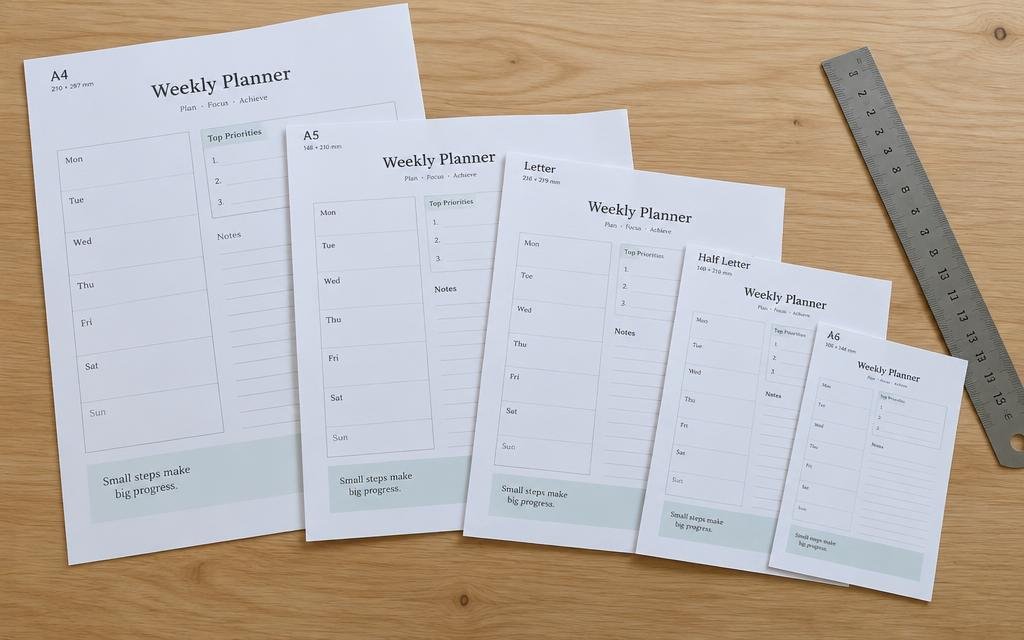
US Letter at 8.5 by 11 inches and A4 at 210 by 297 millimetres cover full-page printing. Half Letter at 5.5 by 8.5 inches and A5 at 148 by 210 millimetres cover the discbound and ring-binder planner market. Those four, exported as separate PDFs, serve the overwhelming majority of buyers. Add Personal and Pocket sizes only if you sell specifically into the Filofax and travellers-notebook communities.
Design once at the largest size
Build your master layout at A4 or Letter with a generous grid, then derive the smaller sizes rather than scaling blindly. Text that reads comfortably at full page becomes cramped at A5 if you simply shrink it: bump body text up a point or two, increase line spacing slightly, and simplify decorative elements. Ten minutes of adjustment per size is what separates a professional bundle from an obviously resized one.
Margins, bleed and the printer reality
Home printers cannot print edge to edge. Keep at least ten millimetres of clear margin on all sides, and more on the binding edge if the page will be punched. If you use a full-bleed background, supply a second 'ink-friendly' version with white space — buyers who print at home will thank you, and buyers who send files to a print shop can still use the bleed version.
Fonts, colours and ink cost
Embed every font on export so nothing substitutes. Use CMYK-safe colours if the file may go to a commercial printer, and avoid heavy solid fills that drain cartridges. Offering a light-ink variant of a decorative planner is a genuine selling point you can name in the listing title, and it is a far better answer to 'this used too much ink' than a refund.
Export settings that avoid trouble
Export PDFs at three hundred DPI, flatten transparency, disable editing if the licence is personal use only, and test-print one page of every size before publishing. Name each file with the size in the filename. If you include an editable version, supply it separately with its own instruction sheet so buyers never open the wrong file first.
- 300 DPI, fonts embedded, transparency flattened
- 10mm minimum margins
- Separate PDF per size
- Size named in the filename
- One test print per size before launch
Explain the sizes in the listing
Add a dedicated sizing image showing each format side by side with its dimensions in both inches and millimetres. Repeat the list in the description under a 'Sizes included' heading. Buyers scanning on a phone will not read a paragraph, but they will read a labelled image, and that image prevents the most common pre-purchase question you will ever receive.
Digital planner users need different files
If your product also serves GoodNotes or Notability users, supply a landscape-format PDF sized for tablet screens, ideally with hyperlinked tabs. That is a different product decision, not a size variant — treat it as its own file, explain it clearly, and consider selling it as an add-on rather than silently including it and confusing print buyers.
Skip the blank page. Browse the shop for instant downloads.
Browse the shop